TrackHeatmapAnalyzer - Rally Stage - Citroen C4 WRC
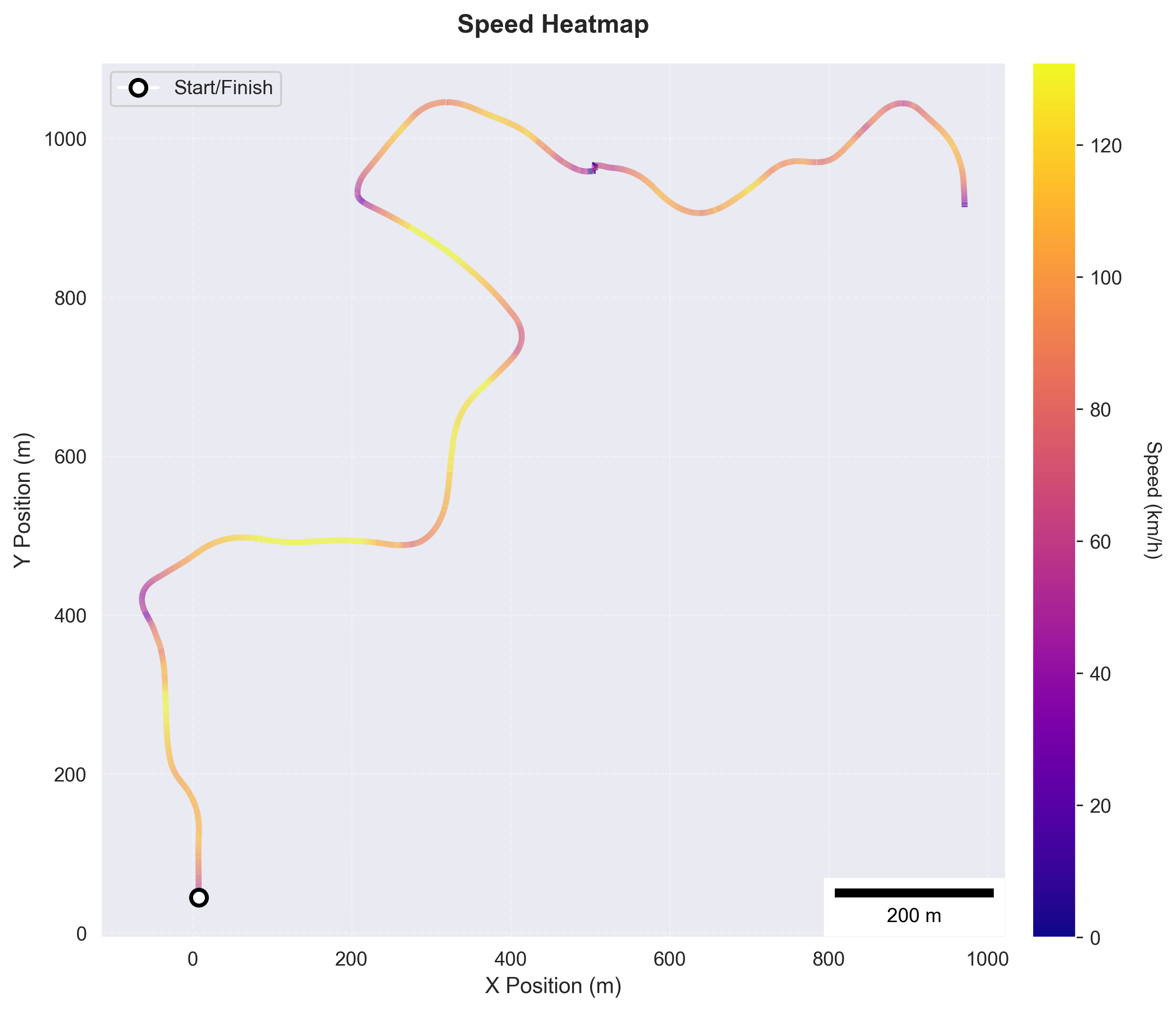
Track heatmap showing speed or other metrics overlaid on track layout
Sample Data
| Attribute | Value |
|---|---|
| Source | motec |
| Category | rally_stage |
| File | /Users/mhild/src/durandom/racing/b4racing/packages/source-motec/tests/fixtures/telemetry-NGP-Car_5-Citroen_C4_WRC-Stage_230-20260122_130000.ld |
Available Channels (30): brake, brake_layer_temp_fl, brake_layer_temp_fr, brake_layer_temp_rl, brake_layer_temp_rr, brake_temp_fl, brake_temp_fr, brake_temp_rl, brake_temp_rr, brake_wear_fl, brake_wear_fr, brake_wear_rl, brake_wear_rr, clutch, damping_force_fl, damping_force_fr, damping_force_rl, damping_force_rr, distance, engine_temp, gear, handbrake, lap_distance_pct, lat_accel, long_accel, pitch, position_x, position_y, position_z, roll
Configuration
| Setting | Value |
|---|---|
| Metadata Only | False |
When to Use
- User asks 'where on track am I fastest/slowest'
- User wants visual speed map of the circuit
- User wants to see racing line colored by performance metric
- User asks to visualize throttle or brake application on track
Key Options
| Option | Description |
|---|---|
lap_selection | best |
value_column | speed |
colormap | viridis |
speed_unit | kph |
Sample Output
Subjects Analyzed: 1 Context: Rally stage data
Default
| Property | Value |
|---|---|
| Format | png |
| DPI | 300 |
| Subjects | 1 |
Example Calls
Show me where on track I'm fastest and slowest
analyze(analyzers='track_heatmap', event='01H8SP4HK4', lap_selection='best', value_column='speed')
Creates speed heatmap of best lap with color from slow (blue/purple) to fast (yellow/red)
Visualize my throttle application on the track
analyze(analyzers='track_heatmap', event='01H8SP4HK4', value_column='throttle', colormap='viridis')
Shows throttle position (0-100%) overlaid on track layout
Generated from b4racing.analysis.graphics.track_heatmap.TrackHeatmapAnalyzer